
- test :
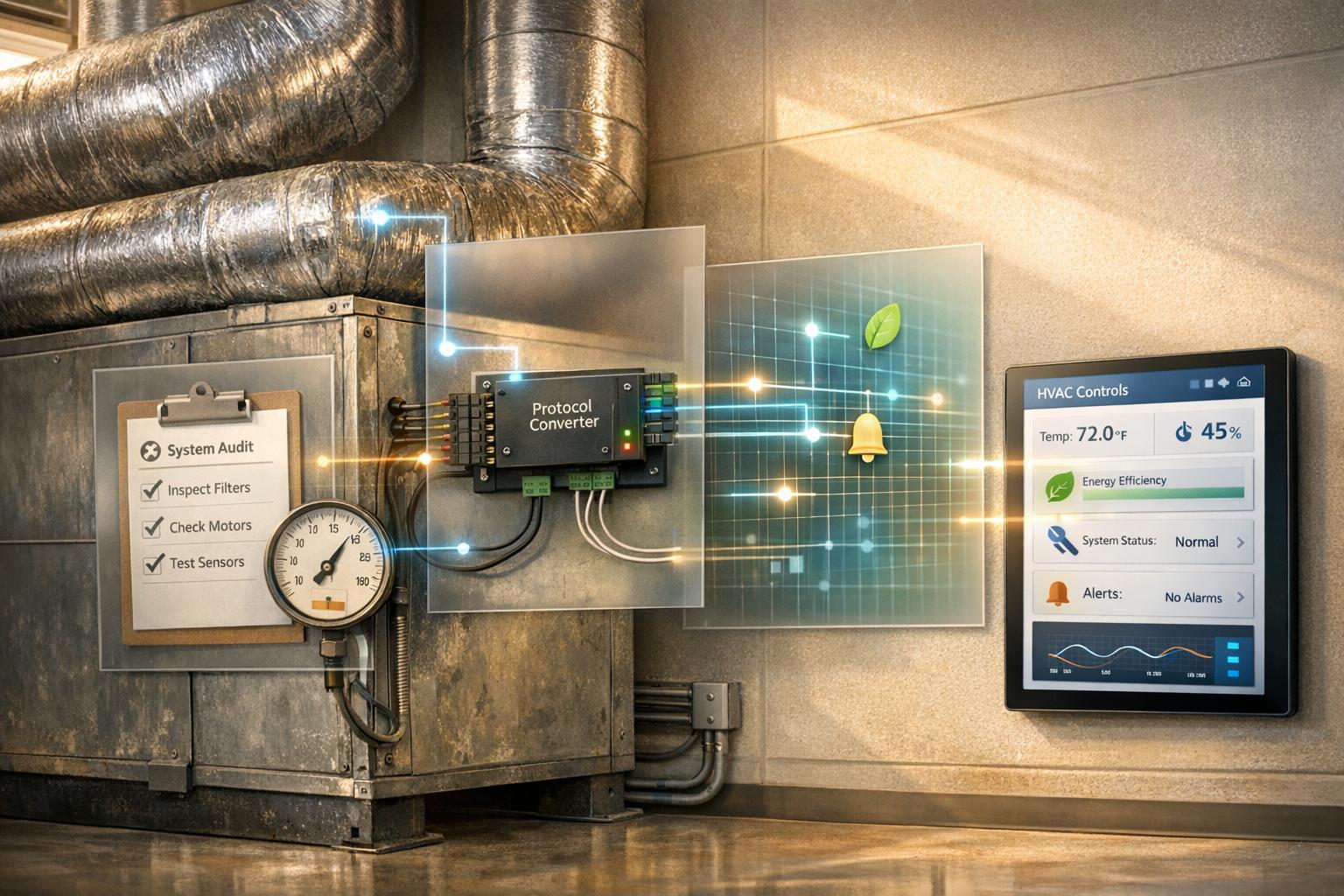
Integrating older HVAC systems with modern Building Automation Systems (BAS) can save money compared to full replacements while improving energy efficiency and system monitoring. Many public facilities in the U.S. rely on HVAC systems that are 15–20 years old, which often use outdated protocols and lack real-time data capabilities. Retrofitting these systems with BAS technology allows for centralized control, remote monitoring, and predictive maintenance.
Key steps for integration include:
- Auditing existing HVAC systems: Identify components, protocols, and compatibility issues.
- Selecting middleware: Use protocol gateways to connect legacy systems with modern BAS.
- Designing a data model: Standardize and normalize data points for seamless integration.
- Implementing and testing: Phase in hardware, ensure data accuracy, and optimize performance.
This process not only extends the lifespan of older systems but also reduces energy waste, improves maintenance efficiency, and supports better system performance. For example, Baylor University retrofitted 10% of its equipment between 2023 and 2025, showcasing a cost-effective, targeted approach. By following these steps, facilities can transition to smarter, more efficient operations while staying within budget constraints.
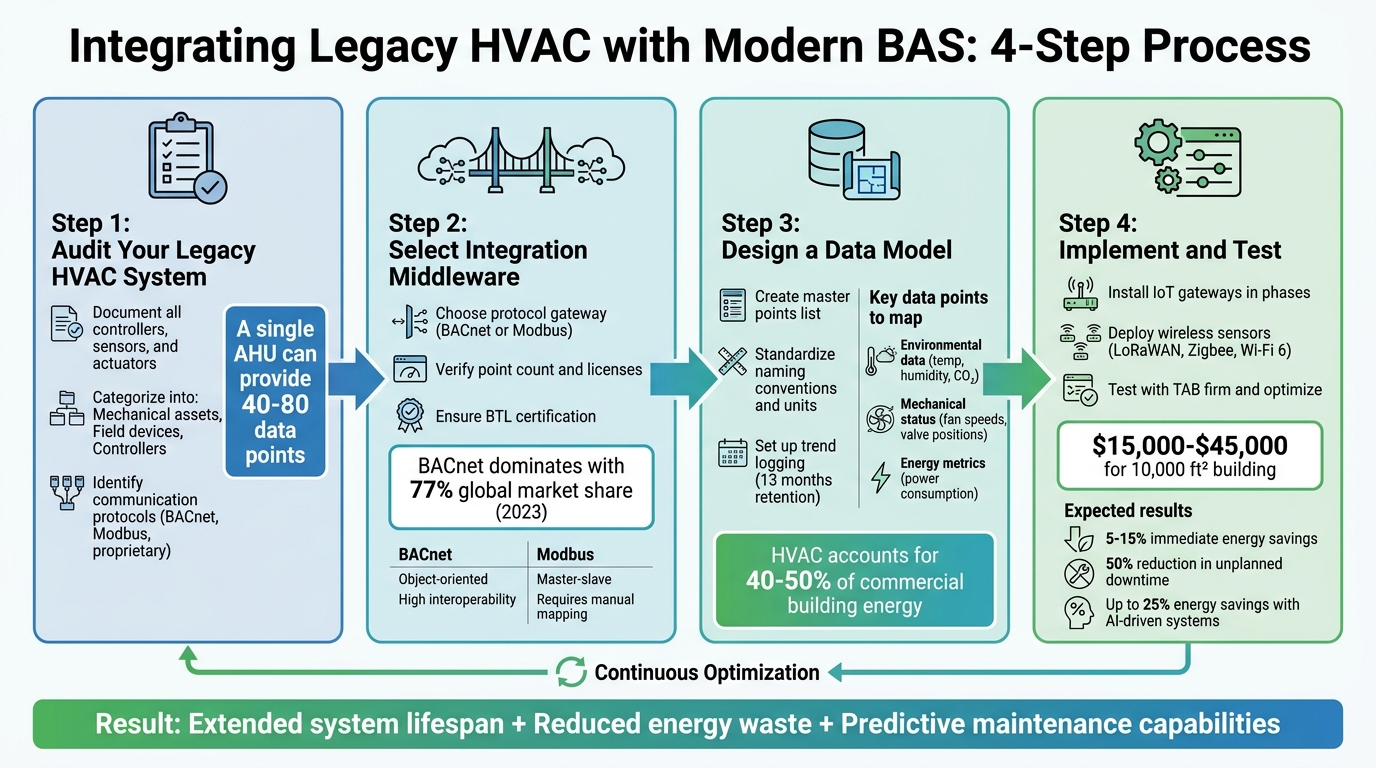
4-Step Process for Integrating Legacy HVAC Systems with Modern BAS
HVAC Integration Basics & the Future of BAS – Webinar 6/12/20
sbb-itb-034f8e1
Step 1: Audit Your Legacy HVAC System for Compatibility
Before integrating a modern Building Automation System (BAS), take stock of every controller, sensor, and actuator in your existing HVAC setup. Document the manufacturer, model, and firmware version for each component. Why is this so important? A single commercial air-handling unit (AHU) can provide 40 to 80 individual data points at the field device level [4]. This inventory becomes the foundation for selecting the right middleware and ensuring smooth integration.
Evaluate Legacy HVAC Components
Start by categorizing your system into three key layers:
- Mechanical assets: This includes AHUs, chillers, boilers, terminal units, exhaust fans, and hydronic heaters.
- Field devices: Sensors (temperature, humidity, CO₂, pressure, airflow), actuators (dampers, valves), and variable frequency drives (VFDs).
- Controllers: Direct Digital Controllers (DDCs) that manage system operations.
Determine whether your controllers use open or proprietary protocols, as this will dictate whether you need a gateway for communication. Some devices may already support BACnet and connect directly. Others might require third-party gateways to translate proprietary protocols. In cases where devices rely on analog or digital hardwired signals, you may need to upgrade to new controllers to enable network connectivity [4].
"A controller that advertises BACnet compliance may expose only 30% of its available data points as standard BACnet objects, with the remaining points accessible only through manufacturer software." – HVAC Trade Network [4]
Determine Communication Protocols
Once you’ve mapped out your equipment, shift your focus to communication methods. Start by inspecting the wiring. BACnet MS/TP and Modbus typically use RS-485 twisted-pair wiring, while BACnet/IP relies on standard Ethernet (UDP port 47808) [5]. For every BACnet-capable device, obtain the Protocol Implementation Conformance Statement (PICS) to confirm which data points are accessible.
For BACnet MS/TP segments, check the quality of RS-485 wiring, termination, and baud rates (usually between 9,600 and 76,800). While the protocol can technically handle up to 127 addresses, field deployments often limit this to 32 or fewer nodes per segment. This helps minimize data collisions and ensures reliable performance [5]. Additionally, verify that safety interlocks – such as freeze protection, high-pressure cutouts, and smoke damper controls – remain managed at the local controller level [4].
Step 2: Select Integration Middleware
After completing your legacy HVAC audit, the next step is to choose middleware that can effectively bridge outdated protocols with modern BAS (Building Automation System) standards. Middleware, often referred to as a protocol gateway, acts as a translator between older communication methods and your BAS. This layer ensures that legacy devices can appear as native BACnet objects within your supervisory system. The right gateway will depend on the protocols your existing equipment uses and the number of data points you need to integrate.
Understanding BACnet and Modbus
Legacy HVAC equipment typically communicates using one of two primary protocols: BACnet or Modbus.
- BACnet: This protocol uses an object-oriented approach, where each device component – like a temperature sensor or damper actuator – is represented as a standardized object type (e.g., Analog Input, Binary Output). This uniformity simplifies data exchange since manufacturers adhere to the same conventions. As of 2023, BACnet dominates the market with a 77% global share in building automation [6], making it the go-to standard for modern BAS platforms.
- Modbus: In contrast, Modbus operates on a simpler master-slave model. Here, a master device polls slave devices using numbered registers and coils. This protocol is common in older boilers, VFDs (Variable Frequency Drives), and energy meters, often using Modbus RTU or ASCII [6]. While Modbus is straightforward to implement, it lacks the self-describing features of BACnet. This means you must manually map each register to understand its data. Additionally, BACnet offers advanced features like Change-of-Value (COV) subscriptions, which reduce network traffic by only sending updates when values change [5]. Modbus, however, relies on constant polling, which can strain older controllers.
| Feature | BACnet | Modbus |
|---|---|---|
| Primary Use | Building Automation (HVAC, lighting, security) | Industrial Automation (PLCs, sensors) |
| Structure | Object-oriented model | Master-slave model |
| Interoperability | High (multi-vendor focus) | Moderate (requires manual mapping) |
| Data Types | Analog Input, Binary Output, Multi-state | Coils, Discrete Inputs, Registers |
| Security | BACnet/SC (Encrypted) | Modbus Secure (Encrypted) or none (Legacy) |
Choose the Right Gateway
When selecting a gateway, ensure it supports your legacy protocol, aligns with your data point requirements, and can normalize data effectively. Start by identifying the transport method your legacy devices use – whether it’s Modbus RTU over RS-485, Modbus TCP over Ethernet, or another proprietary protocol. Then, confirm that the gateway can translate this into your BAS network type, such as BACnet/IP or BACnet MS/TP [7].
Key considerations for selecting a gateway:
- Point Count and Licenses: Gateways are often licensed based on the number of data points (e.g., 250, 500, 1,000). Make sure the license covers all your sensors, setpoints, and status flags, with room for future expansion [7].
- Address Blocks: Reserve address blocks in advance to avoid redesigns later [8].
- Virtual Routing: Opt for gateways with virtual routing capabilities. This feature allows each Modbus device to appear as an individual BACnet-compliant unit, simplifying troubleshooting and enabling the BAS to treat legacy equipment like native BACnet controllers [6].
- Data Handling: Check that the gateway can handle scale factors (e.g., converting an integer value of 725 to 72.5°F), 32-bit float word ordering, and bit extraction for status registers. Misaligned register addressing, such as a mismatch between 0-based and 1-based numbering, can cause data shifts and should be avoided [7].
- Certification and Compatibility: Ensure the gateway is BTL (BACnet Testing Laboratories) certified and compatible with your supervisory platform. Testing during the selection phase is crucial [5][7][8].
Finally, always test the gateway with your actual production supervisory platform before commissioning. Engineering tools might not reveal every issue, such as communication or discovery problems, that could arise in a live environment [8].
Once you’ve chosen the right gateway, you’re ready to move on to designing a unified data model that brings together legacy and modern systems.
Step 3: Design a Data Model for Integration
Create a comprehensive master points list to standardize how legacy HVAC data integrates into your modern BAS. This document serves as a blueprint, mapping each monitored and controlled point – like zone temperatures or compressor status – to a specific controller object name, data type, engineering unit, and alarm threshold [4]. Without this consistency, your BAS might misinterpret data from various manufacturers, leading to errors and unreliable automation.
Identify Key Data Points
Start by focusing on data points that deliver immediate operational value. For instance, an AHU typically offers 40–80 points [4], while a chiller plant might require 150–300 points [4]. Prioritize environmental data (temperatures, humidity, CO₂ levels), mechanical status (fan speeds, valve and damper positions, VFD feedback), and operational setpoints [9][4]. These are essential for maintaining occupant comfort and ensuring systems operate efficiently.
Next, include maintenance and diagnostic data like fault codes, runtime data, filter pressure drops, motor vibrations, and coil efficiency [9][4][11]. This information is critical for predictive maintenance. As Mark Strong from OxMaint points out:
"A BAS dashboard showing a fault alert is not maintenance management – it is information. The value is captured when BAS fault data automatically generates a CMMS work order assigned to the right technician with the right diagnostic context." [9]
Lastly, incorporate energy metrics, such as real-time power consumption and sub-metering data for chillers, boilers, and pumps [9][10]. HVAC systems account for 40% to 50% of commercial building energy consumption [9], so tracking these metrics enables energy-saving strategies like chilled water temperature resets, which can cut chiller energy use by 8% to 20% [9]. Standardizing these data points ensures the gateway translates legacy data seamlessly into the modern BAS.
Verify each device’s PICS to confirm that all mapped data points are complete. This step helps avoid costly redesigns during integration [4]. Once the key points are defined, move on to normalizing the data.
Ensure Data Normalization
After identifying critical data points, the next step is translating them into a consistent format. Data normalization converts raw legacy inputs (e.g., an inconsistent "Temp_1" tag) into a unified structure for your BAS, ERP, or CMMS [11]. This step is crucial because legacy equipment from different manufacturers often uses inconsistent naming conventions, engineering units, and data formats. For example, one controller might report pressure in PSI, while another uses Pascals. Your master points list must standardize such units (e.g., converting all pressure readings to PSI or all temperatures to °F) to prevent downstream calculation errors [4].
Normalized data is also essential for advanced AI-driven analytics, which rely on uniform inputs to predict failures and optimize energy usage [2]. When designing your data model, ensure it aligns with ASHRAE Guideline 36, the industry-standard reference for high-performance sequences of operation [4][2]. This alignment allows your system to implement optimal control strategies, such as demand-controlled ventilation (DCV), which can lower fan energy use by 15% to 25% [9].
Lastly, set up trend logging with defined sampling intervals for all energy-relevant points. Industry best practices recommend retaining 13 months of data to enable year-over-year comparisons [4]. This historical data helps identify performance issues and validates the ROI of your integration project. Keep in mind that critical safety functions, such as freeze protection or high-pressure cutouts, should remain on the local controller [4] to ensure immediate responses, even if the network goes down.
Step 4: Implement and Test the Integration
After creating a unified data model in Step 3, it’s time to move forward with implementing the integration. A phased approach is key here, as it helps minimize disruptions while ensuring the system functions as intended.
Install Gateways in Phases
Start by deploying IoT gateways that bring together data from BACnet, Modbus, and wireless sensors [9]. These gateways play a critical role by translating older protocols into modern standards, effectively turning each device into a BACnet-compliant node [6]. To avoid headaches down the road, opt for gateways with pre-built profiles and edge computing capabilities. This ensures the system remains functional even during network issues.
For example, in a 10,000‑ft² commercial building with a central chiller and 8–12 air handling units, expect hardware and connectivity costs to range between $15,000 and $45,000 [9]. Wireless sensors using LoRaWAN, Zigbee, or Wi‑Fi 6 can complement this setup. These sensors are easy to install, requiring minimal electrical work, and are ideal for filling in monitoring gaps where legacy systems fall short. As Rudy Rodriguez, Director of Maintenance, shared about a recent project:
"They came in on nights and weekends so we never disrupted any classes" [16].
Once the hardware is in place, update software drivers and the BAS interface to align with your unified data model. This step enables centralized monitoring and automation. Don’t forget to collaborate with IT to ensure strong security measures and smooth data sharing [12].
Test and Optimize System Performance
After installing the gateways, it’s time to test the system thoroughly. Make sure there’s seamless, low-latency data exchange between legacy devices and modern software [12]. Partnering with a Testing, Adjusting, and Balancing (TAB) firm is invaluable at this stage. They’ll evaluate system conditions, fine-tune new controls, and verify that critical air terminals don’t exceed 80–90% open during a full cooling test [15]. Additionally, test the system against high-performance sequences like those outlined in ASHRAE Guideline 36 to optimize energy efficiency.
Once testing is complete, fine-tune the system by adjusting air system static pressure and water system differential pressure setpoints [15]. Integrate BAS alerts directly into your CMMS (Computerized Maintenance Management System) so that sensor thresholds automatically trigger prioritized work orders. This proactive approach can cut unplanned HVAC downtime by 50% [9]. Immediate benefits from successful integrations often include 5–15% energy savings [11], while advanced AI-driven retrofits can deliver up to 25% energy savings and a 40% reduction in emissions [13]. Shifting from 24/7 operation to occupancy-based scheduling can further reduce energy use by 10–30% [9][12].
Modern AI-driven systems take things a step further by using machine learning to adapt to seasonal variations and occupancy patterns, continuously improving thermal models [13]. For example, continuous monitoring can detect about 68% of airport HVAC failures 2–4 weeks before they occur [14]. To ensure a smooth transition, develop a phased rollout plan. This approach allows facility staff to adapt gradually while minimizing operational risks [2].
Conclusion
Integrating legacy HVAC systems with modern BAS technology doesn’t have to mean replacing all existing equipment. The process should start with a comprehensive audit to identify current protocols, sensor gaps, and technical specifics. This step creates a clear roadmap, helping to avoid unnecessary expenses by ensuring only the essential components – often less than 10% of the equipment – are replaced [9][11][3].
Using multi-protocol gateways is a practical solution for connecting older HVAC equipment with modern BAS systems. These gateways translate legacy protocols like Modbus into BACnet-compliant data streams, enabling smooth communication between otherwise incompatible systems [9][12]. This compatibility makes it easier to implement changes in phases, reducing disruptions.
A phased rollout approach is key to minimizing operational interruptions. By starting with non-critical areas, facilities can test data accuracy and control sequences before expanding system integration. This gradual transition allows staff to adapt while moving from reactive to predictive maintenance, which can deliver immediate energy savings of 5–15% and cut unplanned downtime by as much as 50% [9][11].
Beyond energy efficiency, centralized data management transforms sensor alerts into automated work orders, fostering a proactive maintenance environment. Emilie Hycinth from IQnext highlights the broader benefits:
"Successful integration with legacy systems does more than extend the life of older systems. It prepares buildings for future growth, supports sustainability goals, and creates a foundation for smarter, data-driven operations" [1].
Considering that HVAC systems typically account for 40–50% of energy use in commercial buildings, leveraging an advanced BAS can reduce overall energy consumption by approximately 29% [9][11]. This strategic integration shifts operations toward a more sustainable, data-driven model, enhancing both efficiency and long-term performance.
FAQs
When does it make more sense to retrofit vs. replace legacy HVAC?
Retrofitting works best when your current HVAC system is still in solid shape – mechanically reliable and ready to handle modern automation upgrades. However, if your system is nearing the end of its typical lifespan (around 15–20 years), breaking down often, or has significant wear and tear, a full replacement is usually the smarter financial choice. Additionally, if energy bills and maintenance costs are climbing, retrofitting might make sense – unless your system simply can’t accommodate the required upgrades. In that case, replacement becomes the better long-term solution.
What data points should I integrate first for fast ROI?
When looking to achieve a quick return on investment (ROI) while integrating legacy HVAC systems with modern Building Automation Systems (BAS), it’s crucial to concentrate on data points that directly impact efficiency and cost reduction. Key areas to focus on include zone temperature sensors, occupancy sensors, and equipment status indicators.
Another smart move is upgrading controls for essential HVAC equipment like chillers, boilers, and air handling units. These updates can significantly cut down on energy waste and lower maintenance costs, providing noticeable savings right away.
How do I keep safety controls working if the BAS network fails?
To keep safety controls functional during a BAS network failure, it’s important to have fallback strategies in place. These can include backup systems or manual overrides to maintain control. Set up local or standalone controls to manage critical tasks – like emergency shut-offs or alarms – without relying on the network. Regular testing and upkeep of these controls are essential to ensure they work reliably when a network outage occurs.