
- test :
A cyberattack on building automation is not just an IT problem. If your BAS is hit, you may lose heating, cooling, door control, air handling, or alarm visibility at the same time.
Here’s the short version:
- Response is harder because IT, facilities, and outside vendors all control parts of the system.
- Containment is riskier because taking one controller offline can affect people, rooms, and safety functions.
- Older BAS devices often have weak logs, plain-text protocols, and flat networks, which makes root-cause work slower.
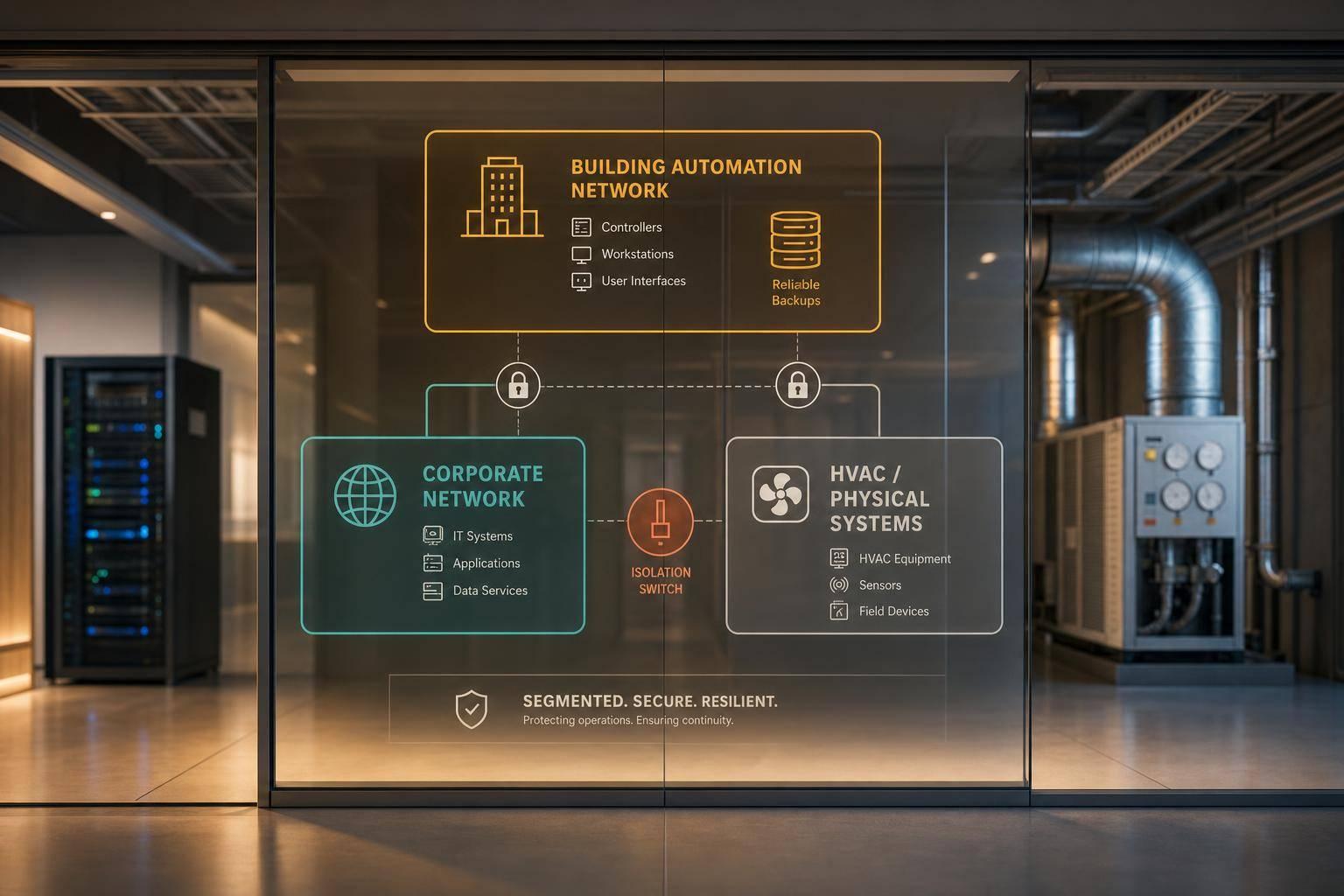
- Good design helps with centralized monitoring, RBAC, MFA, backups, change tracking, and segmented networks.
- Planning matters most: asset maps, isolation steps, vendor access rules, and joint drills should be set before an incident happens.
A few numbers stand out. The article notes that BAS devices may stay in service for 15 to 30 years. It also says teams with tested, building-specific response plans recover about 30% faster. And more than 60% of systems reviewed had vendor or former-staff access that was still active.
If I had to reduce the article to one point, it would be this: you can’t treat BAS response like a normal office-network event. You need a shared plan, a current asset list, and pre-approved isolation choices that protect people first.
That’s the lens for everything else in the article.
SBA 415: Cyber Security for Building Automation Part 4
sbb-itb-034f8e1
How Building Automation Makes Incident Response Harder
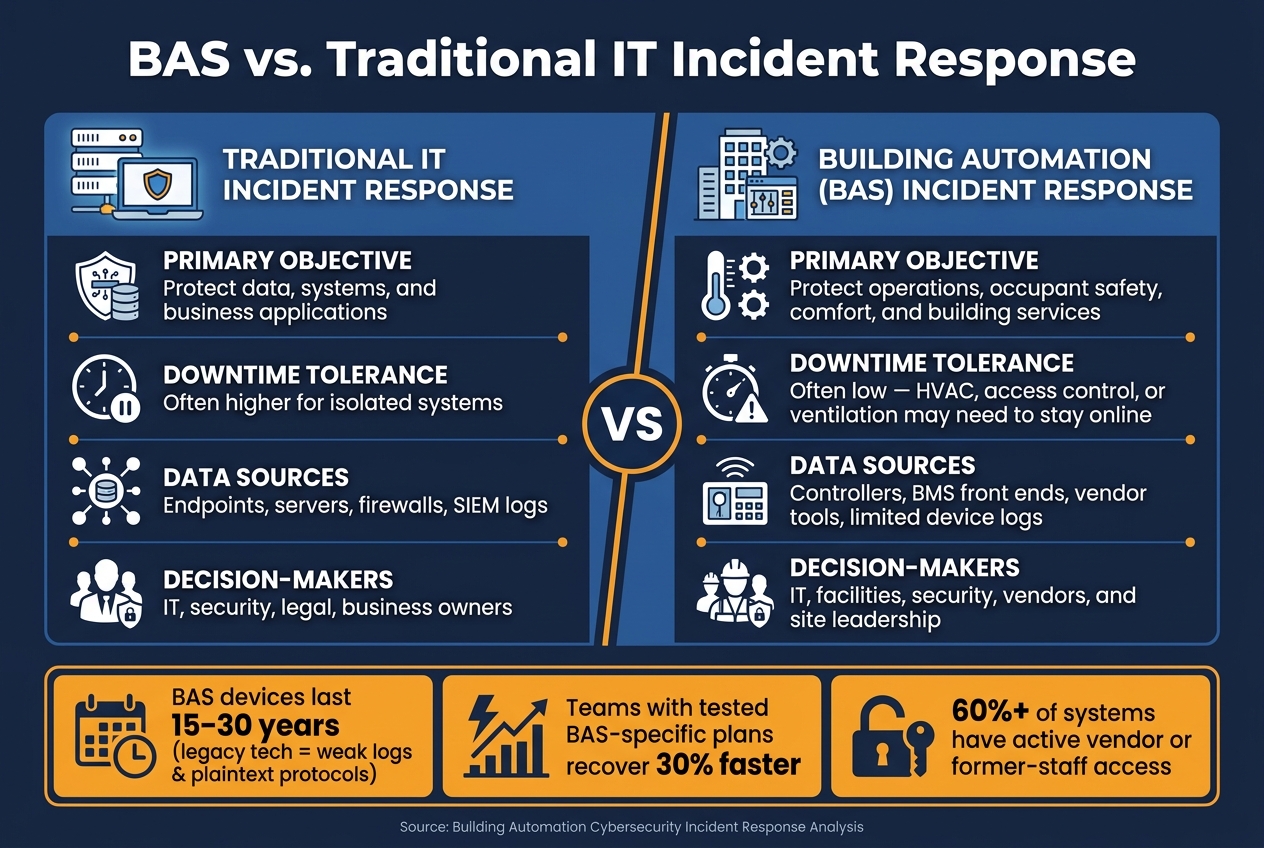
BAS vs. Traditional IT Incident Response: Key Differences
Split Ownership Across IT, Facilities, and Vendors
BAS incidents tend to drag out response because they sit across IT, facilities, and vendor lines – and they affect physical building operations at the same time. The first snag is simple: who owns the response? Facilities, IT, and outside vendors each control part of the system, so nobody has the full picture on day one.
A cyberattack on a BAS can look like an operations issue before it looks like a security issue. Maybe HVAC zones stop responding, and the first call goes to facilities. Meanwhile, IT may not spot a network anomaly for hours [8]. By that point, the clock has already been ticking.
Vendor reliance adds another layer. Many BAS still run on legacy protocols like BACnet and Modbus, and those systems often need specialist help for diagnosis or recovery. If the right vendors aren’t already built into the response plan, teams have to scramble to find qualified support while the incident is still unfolding. That can add a lot of time to a response that was already moving slowly [6][3].
Once the team sorts out ownership, the next problem shows up fast: visibility.
Legacy Controls, Weak Logging, and Flat Networks
BAS devices often remain in service for 15 to 30 years, which means responders are often dealing with limited logs, weak authentication, and little or no encryption [10][1]. And that changes the whole job. If logs are thin, it’s hard to confirm what happened, how far it spread, or what came first.
Protocols like BACnet and Modbus were built for open interoperability, not security. In plain terms, commands can move across the network in plaintext [3][7]. That’s a problem during an incident because responders may not have clean, reliable records to work from.
Flat network design makes containment harder, too. When BAS traffic and corporate IT traffic run on the same infrastructure, one compromised HVAC controller can turn into a path toward more sensitive systems [1][7]. It’s a bit like leaving the mechanical room door open and finding out it also leads to the server room.
When logging is weak and networks are flat, containment can’t be improvised. It has to be planned before anything goes wrong.
| Topic | Traditional IT Incident Response | Building/BAS Incident Response |
|---|---|---|
| Primary objective | Protect data, systems, and business applications | Protect operations, occupant safety, comfort, and building services |
| Downtime tolerance | Often higher for isolated systems | Often low because HVAC, access, or ventilation may need to stay online |
| Data sources | Endpoints, servers, firewalls, SIEM logs | Controllers, BMS front ends, vendor tools, limited device logs |
| Decision-makers | IT, security, legal, business owners | IT, facilities, security, vendors, and site leadership |
Always-On Operations and Life-Safety Limits
Standard IT response often starts with isolation. In a BAS setting, that move can create its own problem. Taking a system offline may disrupt ventilation, access control, or backup power, so responders have to contain the threat without interrupting life-safety functions [9][2].
That’s why each decision takes longer. Before a team isolates anything, they need to know what that system controls, who relies on it, and what happens in the physical space if it goes down [6][5]. If that map doesn’t already exist, those choices get made on the fly, under pressure, and with missing information.
In other words, preplanned isolation decisions aren’t just helpful here – they’re part of the response itself.
How Well-Designed Building Automation Can Support Incident Response
Centralized Monitoring and Clearer Visibility
A BMS built with response in mind gives teams one operational view across connected building systems. That single view helps responders make containment decisions faster because they can see what’s happening across the site instead of piecing it together system by system.
One feature that matters a lot during an incident is baseline behavior analysis. Modern monitoring tools learn what normal device behavior looks like, so odd activity stands out faster. That can include unusual setpoint changes, after-hours activity, or repeated login failures [4].
There’s also a practical point here: these tools usually work passively. They use network taps or SPAN ports instead of agents installed directly on controllers. That’s a big deal in BAS settings, since many devices can’t safely handle active scanning. Passive monitoring lets teams collect traffic data without risking a controller crash in the middle of an incident [4][5].
Still, visibility alone won’t do much if the system doesn’t also include alerting, access controls, and a clean path to recovery.
Automated Alerts, Access Controls, and Change Tracking
Role-based access control (RBAC) limits who can change what. When you pair that with multi-factor authentication (MFA) for remote sessions, it becomes much harder for an attacker to take a stolen account and move deeper into the system [3][2]. It also leaves behind a clear audit trail. If a setpoint changes at 2:00 a.m. on a Saturday, responders can see exactly which account made the change.
Backups matter just as much. Keeping known-good baselines for BMS and PLC programs gives teams a way to roll back to a verified state when a harmful change shows up. That’s a lot better than trying to reprogram controllers by hand while the clock is ticking.
The catch is that these controls have to fit building operations. An automated isolation step that works fine for a corporate laptop could shut down a building function that people depend on. So the goal is pretty simple:
- Alert fast
- Contain with precision
- Restore without delay
Those controls are much more useful when they’re planned before commissioning instead of bolted on after something goes wrong.
Why Security Requirements Belong in BAS Project Design
Cybersecurity requirements should be written into BAS project specifications from day one. That includes network segmentation, logging infrastructure, remote-access hardening, and recovery procedures. When those items are part of the original design, the system is far more likely to help incident response move faster instead of getting in the way [11].
Steps to Connect Incident Response With BAS Operations
Build a Joint IT, OT, and Facilities Response Plan
Once BAS visibility and access controls are set, the response plan needs to answer a few plain questions: who acts, who signs off, and what must stay online. IT-only playbooks tend to fall apart in BAS incidents because operational uptime and life safety come before data confidentiality.
Build one shared plan with named leads from IT, facilities, OT, safety, legal, and communications. Include 24/7 contact details, clear approval authority, and rollback steps. The plan should spell out who can approve containment actions and how rollback works if a containment step causes unintended operational impact [13]. In OT, the response sequence should always put physical safety first, then operational continuity, then evidence preservation [13].
Organizations with tested, building-operations-specific incident response plans recover from cyber incidents 30% faster than those relying on ad-hoc or IT-only procedures [13].
That setup only works if everyone knows the asset map and the isolation choices before an incident begins.
Map BAS Assets and Plan Isolation Scenarios in Advance
After roles are assigned, teams need a current map of every device and each recovery path. Document controllers, field devices, operator workstations, gateways, remote access paths, and protocols such as BACnet, Modbus, LonWorks, and wireless IoT [12][15][14]. A complete asset map speeds up alerts and isolation decisions because responders know what each controller touches.
Teams should also confirm which pieces of critical equipment can shift to manual mode if a controller or network segment has to be isolated [12][2]. When containment is needed, network-level controls can block specific malicious traffic flows while keeping core building communications online [13]. Fire alarm systems must keep priority; BAS can read status, but it cannot override smoke control or fan shutdown commands [15].
It also helps to keep a known-good recovery kit on hand with verified backups and hardware hashes [1].
With isolation steps mapped out, the next job is to rehearse them and keep access in check over time.
Test Playbooks, Train Staff, and Manage the BAS Lifecycle
Testing is what turns a plan from a document into something people can use when the pressure is on. Regular tabletop exercises that simulate scenarios like unauthorized PLC logic modification or a compromised vendor remote access session can expose coordination gaps before a live incident hits [13][2]. Test the decision path in tabletop exercises at both technical and executive levels.
A few areas deserve close attention:
- Vendor remote access should use time-limited, MFA-authenticated sessions tied to specific assets, not persistent VPN credentials [14].
- Review the plan at least annually and whenever major changes are made to building system architecture or connectivity [6].
- Over 60% of systems have been found to carry uncontrolled access from vendors or former employees [12].
Keep the BAS response plan current as systems, vendors, and remote access change. That steady upkeep is what makes planning, execution, and maintenance work as a continuous cycle.
Conclusion: What Public Facility Leaders Should Do Next
The main point is simple: as BAS systems connect to more networks, cybersecurity response has to be part of the design from day one. It can’t be bolted on later. Public facility leaders need to treat BAS security as an operating requirement, not a retrofit.
A few things make incident response harder in these settings. Ownership is often split across teams. Life-safety systems limit what staff can shut down or isolate. And many BAS environments have to stay on at all times. That’s why centralized visibility, strong access controls, and a shared IT/facilities response plan matter so much. But those controls only help when they’re built in from the start.
Public leaders should get IT, facilities, and design teams aligned before any BAS project begins. Then they need to check whether those controls work in practice, not just on paper.
Use a short performance scorecard to keep the program accountable:
| Metric | Recommended Frequency | Purpose |
|---|---|---|
| BAS Asset Coverage | Continuous / Monthly | Maintain 100% visibility of all connected devices |
| Incident Response Time | Per Incident | Measure joint IT/OT plan effectiveness |
| Tabletop Exercise Frequency | Annually / Biannually | Validate staff readiness under realistic scenarios |
| Vendor Access Audits | Quarterly | Confirm only authorized third parties hold active credentials |
| Patch / Firmware Status | Monthly | Surface unaddressed vulnerabilities in controllers and gateways |
Track asset coverage, incident response time, tabletop exercise frequency, vendor access, and patch status. In BAS security, response readiness starts in design and holds up through testing.
FAQs
What counts as a BAS cyber incident?
A BAS cyber incident is unauthorized digital activity or a security control failure that puts facility operations at risk.
In practice, it often shows up as day-to-day operational trouble: HVAC failures, access control lockouts, telemetry loss, or controller performance that turns spotty and hard to trust.
Sometimes the problem isn’t an attacker at all. A badly configured security tool can also disrupt sensitive equipment and create the same kind of operational mess.
That’s why identifying these incidents takes a careful look. You have to separate malicious activity from plain hardware problems or normal operational traffic.
How can we isolate BAS systems without disrupting safety?
Use OT-safe, predefined containment that avoids aggressive isolation or shutdowns. The goal is simple: keep operations running instead of defaulting to IT-style automated response.
Segment the BAS/OT network from the IT network with routers, firewalls, or VLANs. Just as important, make sure response playbooks are shared with facilities teams and engineers so everyone knows what happens if something goes wrong.
For visibility, rely on passive, agentless, protocol-aware monitoring. That lets you detect issues and send alerts without touching controllers, which is often the safer move in OT settings.
What should a BAS response plan include first?
First, it should establish a living inventory of every connected device, including controllers, sensors, gateways, and communication protocols.
You can’t protect or respond to technology you haven’t identified. That record gives teams a clear starting point when they need to assess a problem, isolate it, and cut the risk of unintended downtime or safety hazards.