
- test :
If your BAS is online, it can be reached, misused, or shut down unless you lock down devices, access, updates, and alerts.
I’d boil this article down to five moves: list every BAS asset, separate BAS from office IT, replace shared access with named users and MFA, patch and back up devices with care, and watch logs so your team can act fast. For schools, hospitals, campuses, and public buildings in Texas, that helps cut the risk of HVAC failures, badge-reader outages, alarm issues, and energy waste.
Here’s the full article in one simple list:
- Step 1: Inventory controllers, servers, workstations, protocols, software versions, and owners
- Step 2: Split BAS traffic from business traffic with firewalls and tightly limited routes
- Step 3: Use role-based access, named accounts, MFA, and time-limited vendor access
- Step 4: Update firmware and software during planned windows, with testing and rollback plans
- Step 5: Monitor logins, traffic, device status, and config changes, then follow a BAS-specific response plan
A few points stood out to me:
- Internet-facing BAS devices can show up in public search tools like Shodan
- BACnet/IP on UDP 47808 should never be open to the public internet
- Vendor tunnels and shared logins are common weak points
- End-of-life devices need isolation or replacement if patches are no longer available
- BAS events should feed into a SIEM so IT and facilities can see the same warning signs
Quick comparison
| Step | What I’d focus on | Main risk if skipped |
|---|---|---|
| 1. Inventory assets | Know every device, version, owner, and connection | Blind spots and forgotten internet-facing gear |
| 2. Segment the network | Block direct paths from office systems to controllers | Malware moving from IT into BAS |
| 3. Lock down access | MFA, RBAC, jump hosts, and no shared accounts | Stolen credentials and misuse |
| 4. Update software safely | Test patches, keep backups, plan rollback | Old flaws staying open or outages during updates |
| 5. Monitor and respond | Baselines, SIEM alerts, and response playbooks | Slow detection and messy recovery |
Bottom line: I see this article as a clear BAS hardening checklist. It keeps the focus on uptime, safety, comfort, and energy use without burying the reader in extra detail.
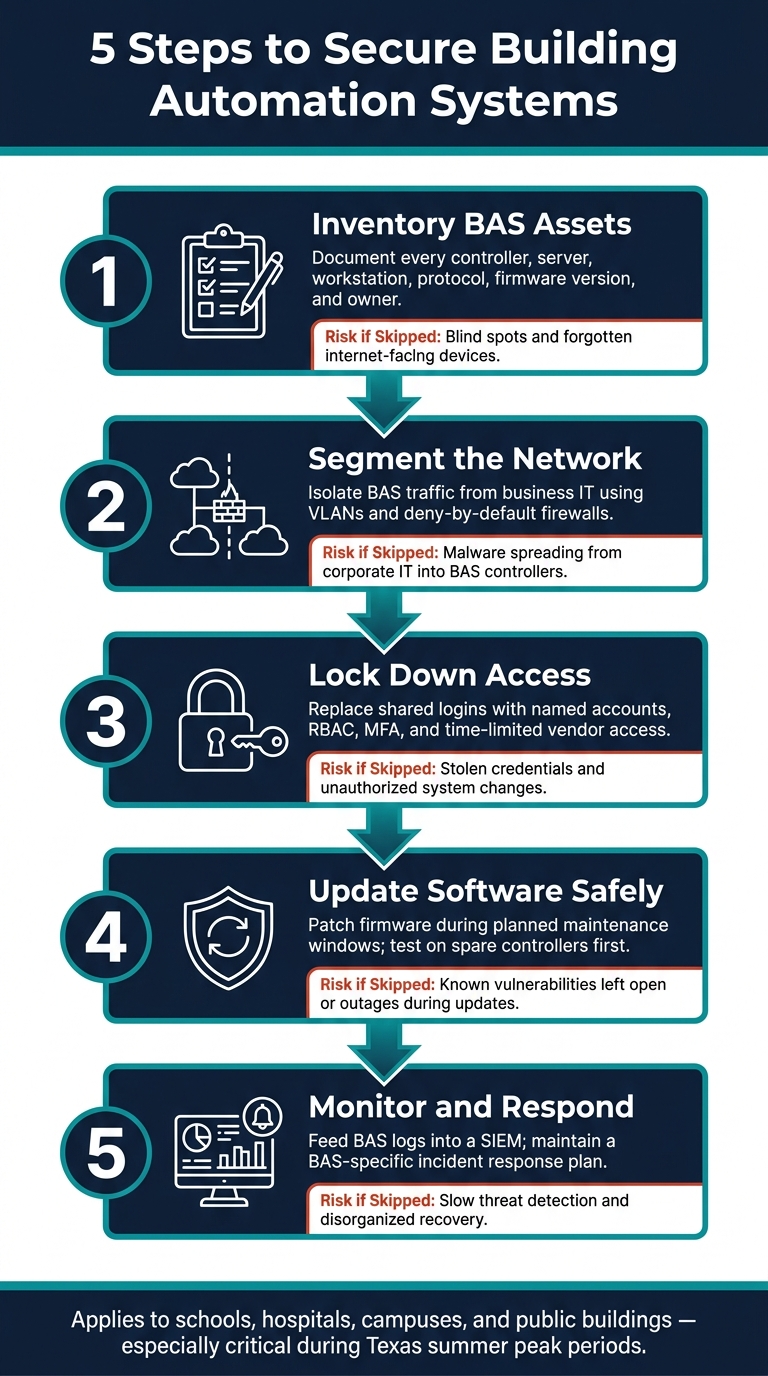
5 Steps to Secure Building Automation Systems (BAS)
Building Automation Systems, Smart Buildings, and 5 Ways To Make Buildings Cyber Secure
sbb-itb-034f8e1
Step 1: Inventory BAS Assets and Map Connections
Before you lock anything down, get a clear picture of what’s in the building and how it talks to everything else.
Document Devices, Owners, and Software Versions
Your inventory should go well beyond HVAC controllers. You need a full list that includes supervisory servers, engineering workstations, and other connected building systems.
For each asset, record:
- Device type
- Physical location such as a control panel, server room, or rooftop unit
- Firmware or software version
- Protocol such as BACnet, Modbus, or KNX
- System owner
- Vendor support contact
Also note each asset’s criticality and whether it is internet-facing. Flag EOL/EOS devices right away. If they no longer get updates, isolate them or replace them [2][5].
Map Approved Data Flows Between BAS and IT Systems
After the device list is done, trace every connection. The point here is simple: separate the data flows you need from the ones you don’t.
That includes connections for analytics tools, historians, remote monitoring portals, and vendor access. It also means spotting links that should be removed or locked down hard.
This step shows which paths must stay open and which ones should be blocked. Give extra attention to the highest-risk pathways: always-on vendor tunnels, remote access points, API gateways, and bridges into corporate IT networks [1]. If a vendor credential gets stolen, an attacker may use that access to move from the BAS network into business systems.
Capture current communication patterns before you restrict traffic [1]. If you start blocking first and mapping later, you can easily cut off vendor support or disrupt day-to-day operations. Use that baseline to set the segmentation rules in Step 2.
Step 2: Segment the BAS Network From Business IT
Start with the traffic map from Step 1 and decide which BAS connections should stay open.
Then use the asset map from Step 1 to separate BAS traffic from business IT. The goal is simple: if a phishing email or ransomware hit spreads through the corporate network, it should not be able to reach controllers or field panels.
That separation helps protect uptime. It also helps protect the schedules and setpoints that drive energy use.
Separate Controllers and Workstations From General Office Traffic
VLANs alone are not security boundaries. They help organize traffic, but they do not control it by themselves. To control who can talk to what, you need Layer 3 boundaries and firewall rules [1].
A practical setup splits the BAS into four zones [1]:
- BAS Management Zone – engineering workstations and supervisory servers
- Control Zone – field controllers, sensors, and field panels
- Integration/DMZ Zone – historians, API gateways, and data export brokers
- Remote Access Zone – VPN endpoints and hardened jump hosts
General office traffic should be blocked from all of these zones. Corporate laptops and guest Wi-Fi should have no routing path into the Control Zone.
And don’t stop at the IT/OT line. Inside the BAS, it often makes sense to split systems apart too. HVAC, lighting, access control, and elevators can be isolated from one another to reduce lateral movement [5][4].
Allow Only Required Connections Through Firewalls
Set firewalls to deny by default. Then allow only the ports and protocols BAS operations need [1][2].
That may sound strict, but it’s far safer than the common habit of allowing broad access first and trying to lock things down later. That approach almost always leaves holes.
Here’s a practical access model:
| Connection Type | Status | Notes |
|---|---|---|
| BACnet/SC (TLS) | Allowed | Encrypted, certificate-based device communication [7] |
| HTTPS (Port 443) | Allowed | Dashboard access from authorized corporate devices to the BAS server |
| VPN / MFA to Remote Access Zone | Allowed | Required for remote contractor or management access [1][6] |
| BACnet/IP (Port 47808/UDP) | Restricted | Blocked from the public internet; allow only within the BAS VLAN or via VPN [6] |
| Telnet / HTTP / RDP | Blocked | Unencrypted or high-risk protocols across network boundaries |
| General office traffic to Control Zone | Blocked | No direct path from corporate workstations to BAS controllers |
| API Gateways / Historians | Restricted | Place in DMZ; limit to specific data export flows only [1] |
If BACnet traffic stops working after segmentation, one common cause is blocked broadcast traffic. When that happens, go back to the Step 1 baseline and use it to build tight allowlists [1].
These boundaries create the access model you’ll tighten in Step 3.
Step 3: Lock Down User Access and Authentication
Segmented networks help, but they don’t solve the whole problem. If BAS credentials are weak, the system is still exposed. Segmentation limits where someone can go. Access control limits what they can do after they get in.
Replace Shared Logins With Role-Based Accounts
Use the inventory and network map from Steps 1 and 2 to assign access by role, not by convenience.
Anyone who can change logic, setpoints, schedules, or alarm routing needs a named account [1][2].
After that, apply role-based access control (RBAC) so each person gets only the permissions tied to their job. An HVAC contractor should not be able to disable security alarms, and a facilities operator should not have access to system configuration or user management [2]. That’s least privilege in plain terms.
Review permissions on a regular basis and turn off unused accounts. If an employee or contractor leaves, revoke BAS, VPN, vendor portal, and badge access right away [1].
Control Remote and Third-Party Access
Always-on vendor tunnels are a risk. A better path is just-in-time (JIT) access that is time-limited, task-specific, and auto-expires [1][4]. Require all remote users to go through a hardened jump host instead of connecting straight to controllers. Also enforce multi-factor authentication (MFA) for all remote logins and admin accounts [1][2][6].
The table below sums up the recommended access levels by role:
| Role | Recommended Access Level | Key Restrictions |
|---|---|---|
| Administrator | Full System Access | Requires MFA; restricted to internal management network or secure jump host. |
| Operator | Read/Write (Schedules & Setpoints) | No access to system configuration, logic programming, or user management. |
| Vendor/Contractor | Time-Limited / Scoped Access | Access limited to specific equipment (e.g., HVAC only); requires approval workflow and session logging. |
| View-Only User | Read-Only (Dashboards) | No ability to change any parameters or acknowledge critical alarms. |
Log logins, session times, privilege changes, and configuration edits for Step 5 monitoring and incident response. Those records support the monitoring and incident response work in Step 5.
Step 4: Update BAS Software Safely
Strong access controls help, but old software can still leave the door open. BAS updates need to happen without knocking out HVAC, lighting, or life-safety systems. They also can’t wipe out the schedules and setpoints that keep the building running the way it should.
Follow a Safe Patch and Firmware Update Process
Start with your asset inventory and sort devices by how much downtime they can handle. Patch low-risk controllers first. Put critical systems into approved maintenance windows. And if seasonal equipment can’t reboot safely right now, wait until it can.
Only download updates from verified vendor sources. Before you install anything, check the file integrity. A damaged or tampered firmware file can disrupt operations just like a direct attack.
Test updates on a spare controller or in a staging setup first. Write down rollback steps before deployment. Keep offline configuration backups, and make sure they restore cleanly. If a controller gets bricked, a pre-configured spare or known-good firmware image can get it back up fast.
The update window is also a good time to lock the device down. Disable unused services like FTP and Telnet, remove default accounts, and follow vendor hardening guidance. That helps protect setpoints, schedules, and uptime, not just the device itself.
Use this rule set to pick the rollout method for each device:
| Update Type | When It Applies | Operational Impact | How to Handle It |
|---|---|---|---|
| Emergency Patch | Active exploit or critical vulnerability, such as a zero-day | High; may require immediate reboot | Deploy as soon as possible; keep rollback support on standby [1][2] |
| Routine Maintenance | Standard vendor release for bugs or minor security fixes | Low; deploy during approved maintenance windows | Test in staging first; roll out in stages [1][2][3] |
| Deferred Upgrade | Legacy or end-of-life systems with no available patch | Temporary risk; rely on compensating controls until replacement | Tighten segmentation and increase monitoring until hardware replacement is planned [1][2] |
For end-of-life controllers that no longer get vendor updates, patching just isn’t on the table. In that situation, strict network isolation is the practical stopgap while you plan a phased replacement [1][2]. Leaving an unpatched legacy device on an unsegmented network creates the highest risk.
Once updates are under control, monitoring helps spot failed patches and any change that wasn’t expected.
Step 5: Monitor BAS Activity and Prepare for Incidents
Ongoing monitoring helps your team catch trouble early, before it turns into an outage, a safety issue, or a long cleanup job.
Watch for Login, Network, and Device Anomalies
Once updates and access controls are in place, the next job is simple: watch for signs that something still slipped through.
Start with remote access gateways, zone firewalls, and management workstations. These are usually the first places where misuse shows up.
The table below shows the difference between normal BAS activity and the kinds of signals your team should escalate:
| Activity Category | Normal BAS Indicators | Warning Signs to Escalate |
|---|---|---|
| User Access | Logins from known staff during scheduled shifts | Repeated failed logins; logins at unusual hours; new local administrator accounts; unauthorized privilege elevation |
| Network Traffic | Consistent, predictable data flow between known controllers | Surges in traffic; connections to unknown external IPs; new or unauthorized devices; unauthorized protocols |
| Device Status | High uptime for critical controllers; expected heartbeat signals | Devices going offline unexpectedly; unresponsive controllers; commands issued outside normal operational parameters |
| System Config | Changes made and logged during maintenance windows | Changes to logic, setpoints, schedules, or alarm routing outside documented maintenance windows; changes by unknown users |
| Alarms | Normal operational alarms (e.g., temperature thresholds) | Changes to alarm routing; security alarms being disabled |
Send BAS access, alarm, and network logs to a SIEM so building events can be tied to IT alerts. Also, build a traffic baseline first. Without that baseline, odd communications can blend into the background. With it, they stand out much faster.
Build a BAS Incident Response Plan
When alerts fire, staff shouldn’t have to stop and guess who owns the first move. The plan needs to spell that out.
A generic IT incident response plan usually falls short in a BAS setting. Why? Because shutting down control systems the same way you’d shut down office IT can create safety problems and disrupt building operations.
Set a RACI matrix across IT security, facilities, and vendors. Write containment playbooks for isolating BAS segments and cutting off remote access. Set the recovery order as alarms first, monitoring second, and control functions third. Train staff to switch critical equipment to manual mode, and run one tabletop exercise each year.
That way, the BAS can be brought back in a controlled way without putting safety at risk.
Conclusion: A 5-Step BAS Security Checklist for Texas Facilities
Use this checklist to assign ownership, set a review schedule, and make sure each task has a clear point person.
| Step | Core Action | Primary Owner | Review Frequency |
|---|---|---|---|
| 1. Inventory Assets | Document all controllers, sensors, and firmware versions | Facilities Manager | Quarterly or after any system change |
| 2. Segment the Network | Isolate BAS from IT using VLANs and "deny by default" firewalls | IT / Network Security | Annual firewall rule audit |
| 3. Lock Down Access | Replace shared logins with role-based accounts and MFA | Building Engineer | Monthly account review |
| 4. Update Software Safely | Patch firmware during maintenance windows; test on spare controllers first | Facilities + Vendor | Per vendor release / maintenance windows |
| 5. Monitor and Respond | Feed logs into a SIEM; maintain a BAS-specific incident response plan | IT Security + Facilities | Continuous (automated) / Annual drills |
Stick to the review schedule so your security controls stay in step with building operations, maintenance windows, and energy goals.
Timing matters even more when cooling demand is at its highest. In Texas, plan patches and reboots with care during summer peak periods to protect occupant comfort and keep energy performance on track.
For Texas facilities planning BAS upgrades or new builds, E3 Design-Build Contractor can help build security into the design from the start.
FAQs
How do I know if my BAS is exposed online?
Check your Building Automation System on a regular basis with both internal and external exposure reviews. Tools like Shodan and Censys can show whether your building systems are connected to the internet and visible from the outside.
As a starting point, your BAS should not be directly reachable through a public IP address or open ports. If it’s internet-facing, it faces a high risk of being targeted.
What should I do if my BAS includes end-of-life devices?
Use compensating controls to cut risk. Put end-of-life devices in tighter network segments, limit remote access, and step up monitoring so you can spot unusual activity early.
Patching often gets tricky here. Vendors may control the update path, and uptime demands can make changes hard to schedule. So instead of rushing to update these systems, keep a current inventory of the assets and document a clear, risk-based management process.
Who should own BAS security in a facility?
Ultimately, the facility owner is on the hook for BAS cybersecurity.
Because this work cuts across departments and outside project teams, the owner needs to pull the right people into the same room. That usually means a cross-functional group with executive management, legal, HR, IT, facility management, and security or risk officers.
The goal is simple: set the requirements up front and fold BAS into a site-wide risk assessment and security plan. If that doesn’t happen, pieces get missed, and cybersecurity can turn into everyone’s job and no one’s job at the same time.